Current .Net Version: 2.0.50727
Home
Articles
C# & .Net Framework Reference
Practice C# Online
XML Web Services
RSS Feeds
Code Snippets
T-SQL Scripts
Videos
Valuable Links
Contact Us
Mike's C#, VS.NET and SQL Blog


ROR XML Info.
Service Broker - Contracts
Author: Michael G.     Last Updated:12/17/2004 4:04:00 PM
Category(ies): SQL Server 2005
Description: An explanation on how contracts regulate communication flows in Service Broker.
  Add & View Comments About this Article

Tested with .Net 2.0.40607.42 and SQL Server 2005 9.00.852

  • Service Broker Architecture
  • Service Broker Conversation Architecture
  • Service Broker Message Types
  • Service Broker Contracts
  • Service Broker Links
  • Service Broker Queues
  • Service Broker Services
  • Service Broker Service Programs
  • Service Broker Dialogs
  • < Back | Next >

  • What are Contracts?
  • Understanding Conversation Endpoints
  • Understanding Initiators and Targets
  • Creating Contracts

  • Service Broker Contracts

    What are Contracts?

    Contracts are agreements between two Service Broker
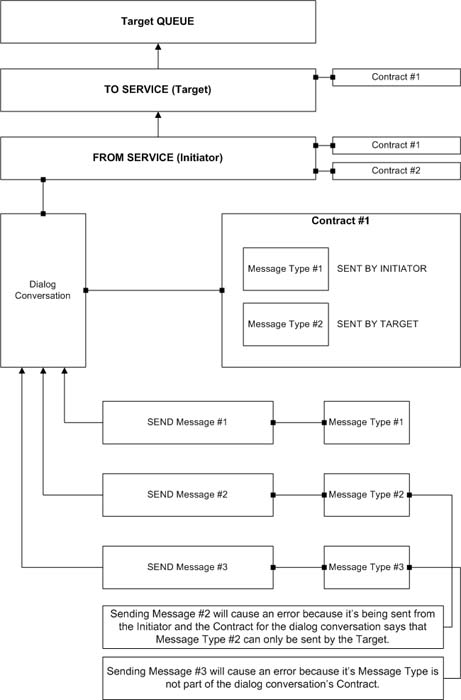
    Services and two Dialog Conversation Endpoints over which Conversation Endpoint, the initiator or target, can send messages of particular Message Types in a dialog conversation. The initiator is the Conversation Endpoint that starts a dialog conversation while the target is the Conversation Endpoint that is the intended recipient of messages sent through that conversation. Each dialog conversation must adhere to the rules of a Contract. Each contract contains one or more Message Types that can be used during a dialog conversation between two Services or, when using the same Service, between two Dialog Conversation Endpoints. Also, each Service is defined with one or more Contracts. So, there are two places where Contracts are specified: 1) when creating a Service and 2) when initiating a Dialog Conversation. Once a Service has been created, you no longer have to specify which Contracts that Service can use. Dialogs, on the other hand, have their associated Contracts specified at the time they're created and, since you must first create a dialog in order to send messages (unless you're responding to an existing dialog conversation from the Target) through it, Contracts are specified at each creation of a new dialog conversation.

    Understanding Conversation Endpoints

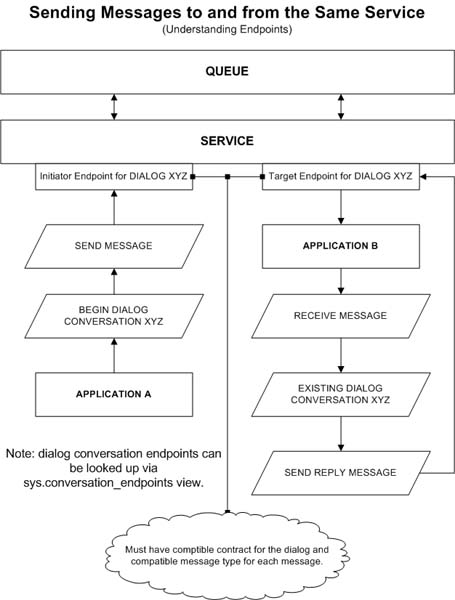
    Since you can send messages to and from the same Service, it's important to understand that the Initiator is the endpoint that creates a dialog conversation while the Target is the endpoint that receives messages through that dialog conversation. Conversation Endpoints are a means to an end. Conversation Endpoints are necessary in order to track who is the Initiator, the side that has begun a dialog conversation, and who is the Target, the side that is the intended recipient of that dialog conversation. This is necessary since the Initiating Service can be the same as the Target Service. It is inappropriate to call the initiator of a dialog conversation the Initiator Service and the recipient of it the Target Service if both sides of the conversation are coming from the same Service. So, in order to resolve this issue, conversation endpoints are created for both the Initiator and Target of a Dialog Conversation. If Service Broker only allowed messages to be delivered from one Service to a completely different Service then the use of Endpoints would not be necessary. But, because you can send messages to and from the same Service, they are. So, to say that we're sending messages from an Initiating Service to a Target Service would be incorrect if they were both the same Service. However, if we're sending messages from one Service to a another, then it's OK. The following diagram illustrates this concept.
    Service Broker Contracts Sent By Initiator and Target Example

    In the preceding diagram, we could not say that Application A is sending a message from Service A to Service B because no such thing exists. Rather, we could say that Application A is sending a message from Endpoint A (the Initiator) to Endpoint B (the Target).

    Now, just because messages are sent to and from the same Service does not mean that Service Broker only creates endpoints for dialog conversations under this situation. Endpoints for both the Initiator and Target are always created whenever a dialog conversation is created - no matter whether the messages are sent to and from the same Service or an entirely different Service. It's also important to remember that endpoints are created for each and every dialog conversation, regardless of how many messages are sent through each of those dialogs.

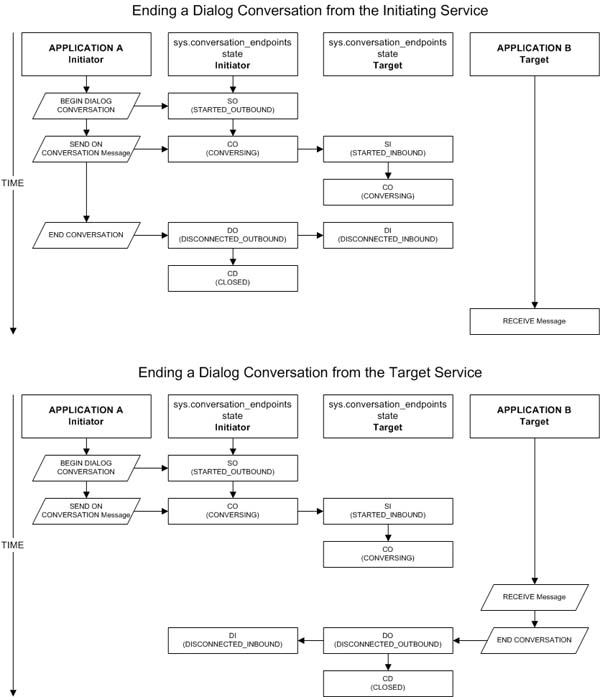
    When a dialog conversation is started, Service Broker adds an Endpoint record to the Initiator's broker database. This Endpoint record is marked as having a state of SO, or STARTED_OUTBOUND. After the first message is sent through the dialog conversation, Service Broker updates this Endpoint record with a state of CO, or CONVERSING. Dialog conversations are said be in a CONVERSING state until they have ended. When the Target receives the message from the Initiator, Service Broker adds an Endpoint record to the Target's broker database and marks it as having a state of SI, or STARTED_INBOUND. If the messsage was successfully received by the Target, Service Broker updates this Endpoint record with a state of CO, or CONVERSING. At this point, both the Initiator and the Target Endpoints are in a CONVERSING state.

    Once either the Initiator or Target explicitly end the dialog conversation, Service Broker updates the Endpoint record for the dialog conversation at the Initiator's broker database with a state of DO, or DISCONNECTED_OUTBOUND. Then, Service Broker updates the Endpoint record for the dialog conversation at the Target's broker database with a state of DI, or DISCONNECTED_INBOUND. Once both Endpoints are disconnected, Service Broker updates the Endpoint record for the Endpoint that ended the conversation with a state of CD, or CLOSED. Conversation Endpoints never reach states of Disconnected and Closed unless the Dialog Conversation has been explicitly ended by either the Initiating or Target Endpoints.

    When any Endpoint, Initiator or Target, has a Dialog Conversation state that is disconnected, either Disconnected Outbound or Disconnected Inbound, the Dialog Conversation is essentially ended. Disconnected states are ways for Endpoints to tell each other that they have ended a Dialog Conversation. The only time a Dialog Conversation is marked as being Closed is when both Initiator and Target Endpoints have reached Disconnected states. The Initiator Endpoint will always have a state of DISCONNECTED_OUTBOUND (since it's the Initiator) while the Target Endpoint will always have a state of DISCONNECTED_INBOUND (since it's the Target) whenever either side ends a dialog conversation explicitly. It is only until both Endpoints have acknowledged this state that the Dialog Conversation is considered Closed, otherwise, it's simply considered being Disconnected. Either way, neither the Initiator or Target can send messages through a dialog conversation that's marked as Disconnected. I just thought I'd mention it as an FYI.

    The following illustrations put two different dialog conversations into perspective.


    According to Microsoft, Endpoint records are saved in the database for about an hour or so. This was designed to prevent reply attacks. If a dialog conversation is ended cleanly (without errors), the conversation endpoint record is deleted from the database at both Endpoints (Target and Initiator) in about an hour or so. If an error has occured, the conversation endpoint record is saved indefinitely. Conversation Endpoints are useful because their states can be evaluated for error conditions. If any one dialog conversation's message fails to be delivered or received, the Endpoint's state is set to ER, or ERROR.

    Conversation Endpoints can be looked up via querying the sys.conversation_endpoints catalog view in the local broker's database. Dialog conversations have a globally identifier that allows you to track them across Endpoints: conversation_id. conversation_id is a column in sys.conversation_endpoints of type UNIQUEIDENTIFIER. When a successful dialog conversation between an Initiator and Target Endpoint is made, a sys.conversation_endpoints record is to the Endpoint's local broker's database. If both the Initiator and Target Endpoint are the same Service Broker Service, two records are added to the broker's database. They will both have the same conversation_id identifier; however, the Target will have an is_initiator column value of 0 while the Initiator will have an is_initiator column value of 1.

    Purging Left Over Conversation Endpoint Records

    When dialog conversations encounter errors, their Conversation Endpoint records are saved indefinitely. This can become a problem if a situation occurs where thousands of dialog conversations end up encountering error conditions. You could end up with quite a large number of records. This could lead to a considerably large amount of disk space usage. If Conversation Endpoint records do not have a state of 'ER' (ERROR), then their states will be whatever they were right their conversations ended (due, most likely to an error condition). Conversation Endpoint records can have the following states: SO - STARTED_OUTBOUND, SI - STARTED_INBOUND, CO - CONVERSING, DI - DISCONNECTED_INBOUND, DO - DISCONNECTED_OUTBOUND, CD - CLOSED and ER - ERROR. Luckily, you can purge these Conversation Endpoint records from the local broker's database by simply ending their conversations explicitly with the CLEANUP option. The following T-SQL script shows how you can do this: -- This script will purge ALL Service Broker -- Conversation Endpoint records in the current database -- AND ALL associated messages: DECLARE c_PurgeConversationEndpoints CURSOR FAST_FORWARD FOR SELECT conversation_handle FROM sys.conversation_endpoints WHERE is_system = 0; OPEN c_PurgeConversationEndpoints; DECLARE @DialogHandle UNIQUEIDENTIFIER; FETCH NEXT FROM c_PurgeConversationEndpoints INTO @DialogHandle; WHILE @@FETCH_STATUS = 0 BEGIN END CONVERSATION @DialogHandle WITH CLEANUP; FETCH NEXT FROM c_PurgeConversationEndpoints INTO @DialogHandle; END CLOSE c_PurgeConversationEndpoints; DEALLOCATE c_PurgeConversationEndpoints;
    WARNING: ending dialog conversations in sys.conversation_endpoints with a script such as the one above will cause ALL messages in the broker's queue(s) to be purged accordingly. Make sure any messages waiting to be retrieved from the local broker's queue(s) are first retrieved before ending all conversations in sys.conversation_endpoints.

    sys.conversation_endpoints Catalog View
    • conversation_handle - uniqueidentifier; Identifier for the conversation endpoint, one side of the conversation.
    • conversation_id - uniqueidentifier; Identifier for the conversation. This identifier is shared by both participants in the conversation. This together with the is_initiator column is unique within the database.
    • is_initiator - tinyint; Is this endpoint the initiator of the conversation?
    • service_contract_id - int; Identifier of the contract for this conversation.
    • conversation_group_id - uniqueidentifier; Identifier for the conversation group this conversation belongs to.
    • service_id - int; Identifier for the service for this side of the conversation./li>
    • lifetime - datetime; Expiration date/time for this conversation.
    • state - char(2); State of conversation endpoint, one of: SO - STARTED_OUTBOUND, SI - STARTED_INBOUND, CO - CONVERSING, DI - DISCONNECTED_INBOUND, DO - DISCONNECTED_OUTBOUND, CD - CLOSED or ER - ERROR.
    • state_desc - nvarchar(60); STARTED_OUTBOUND, STARTED_INBOUND, CONVERSING, DISCONNECTED_INBOUND, DISCONNECTED_OUTBOUND, CLOSED or ERROR.
    • far_service - nvarchar(256); Name of service on far side of conversation.
    • far_broker_instance - nvarchar(128); The broker instance for the remote side of the conversation.
    • principal_id - int; Identifier of the principal whose certificate is used by the dialog initiator.
    • far_principal_id - int; Identifier of the user whose certificate is used by the dialog target.
    • outbound_session_key_identifier - uniqueidentifier; Identifier for outbound encryption key for this dialog.
    • inbound_session_key_identifier - uniqueidentifier; Identifier for inbound encryption key for this dialog.
    • security_timestamp - datetime; Time at which keys were created.
    • dialog_timer - datetime; The time at which the conversation timer for this dialog sends a DialogTimer message.
    • send_sequence - bigint; Next message number in the send sequence.
    • last_send_tran_id - binary(6); Internal transaction ID of last transaction to send a message.
    • end_dialog_sequence - bigint; The sequence number of the End Dialog message.
    • receive_sequence - bigint; Next message number expected in message receive sequence.
    • end_dialog_sequence - int; Next message fragment number expected in message receive sequence.
    • receive_sequence - bigint; Next message number expected in message receive sequence.
    • receive_sequence_frag - bigint; Next message fragment number expected in message receive sequence.
    • system_sequence - bigint; The sequence number of the last system message for this dialog.
    • first_out_of_order_sequence - bigint; The sequence number of the first message in the out of order messages for this dialog.
    • last_out_of_order_sequence - bigint; The sequence number of the last message in the out of order messages for this dialog.
    • last_out_of_order_frag - int; Sequence number of the last message in the out of order fragments for this dialog.
    • is_system - bit; 1 if this is a system dialog.

    Understanding Initiators and Targets

    It is important to understand what Initiator and Target means in order to fully understand how Contracts and Dialogs work. The Initiator is the application that has begun, or started, a Dialog Conversation. The Target is the intended recipient for messages sent by the Initiator through that Dialog Conversation. Do not confuse Initiator to mean the Service or Service Program (application) that is sending messages. Do not confuse Target to mean the Service or Service Program that receives those messages. Rather, Initiator and Target refer to a Dialog Conversation and not which side is sending or receiving messages. Initiator refers to an Initiating Conversation Endpoint while Target refers to a Target Conversation Endpoint. So, when we talk about Initiator and Initiating, we're talking about the Initiator and Initiating Conversation Endpoint. When we talk about Target, we're talking about the Target Conversation Endpoint. The Initiator is simply the Conversation Endpoint that has started a Dialog Conversation with a Target. This does not mean that when a Target Conversation Endpoint replies back to the Iniator with one or messages that the Target is now considered the Initiator. So, remember, Initiating and Target Endpoints merely indicate who has started a conversation and who is the itended recipient of that conversation.

    A Service Broker Service creates an Initiator Conversation Endpoint when it receives a new Dialog Conversation. A Service Broker Service creates a Target conversation Endpoint when it receives the first successful message from that Dialog Conversation. Conversation Endpoints can be looked up via the sys.conversartion_endpoints catelog view for each Service Broker database. Dont' think of a Service as a Conversation Endpoint, rather, think of it as an interface through which you create Dialog Conversations and send messages. Even though it's a Service that delivers messages, it is not unique for each Dialog Conversations. Rather, Conversation Endpoints are unique for each Dialog Conversation.

    Creating Contracts


    Comments Click Here to Add your Comment
    No Comments Found.
     
    COPYRIGHT/DISCLAIMER | CONTACT US