The identity incremental feature of the DataGrid control conflicts with MS SQL Server when hosting a DataSet with an identity column. Learn how to fix this.
This article may help you if you are building Windows Forms applications that meet all of the following criteria:
An MS SQL Server (or MSDE) database table with an Identity column.
A DataGrid control.
A DataSet with an Identity column in a given table.
The DataGrid uses the DataSet as its DataSource.
An SqlDataAdapter component used to modify or add data stored in a MS SQL Server table.
Identity values maintained by a DataGrid hosting a DataSet object are local and do not derive from
those identity values generated by the data store - in this case, MS SQL Server.
In the example above, if you click on the new record selector, at the bottom of the DataGrid, a new identity is
automatically generated by the DataGrid if an Auto Increment property is set to true on a table in the DataSet.
If you don't end up creating the record by entering data in the TestText column,
then navigating out of the record, the next identity value is used for when
you do end up creating a new record in the grid. This can be a problem since identity values generated by the
DataGrid do not conincide with those generated by MS SQL Server.
Anytime a new record is added to a DataGrid that is bound to an auto-incrementing identity in a DataSet DataTable,
the identity field is automatically incremented for you.
If you use an SqlDataAdapter to update the data in the DataGrid, then an INSERT statement is
automatically generated for you by default. After the INSERT statement occurs, a proceeding SELECT
is used to retrieve a 'refreshed' version of the record from the MS SQL Server database. Now, if
the SqlDataAdapterInsertCommand's UpdateRowSource is set to Both or
FirstReturnedRecord, then it is assumed that the values in the DataRow affected by the INSERT
should be automatically updated - this does not happen!
It is up to you to update the affected DataRow's identity column with the appropriate identity value yourself.
A DataRow typically contains two versions of the row after an INSERT statement is performed against it:
Original and Current.
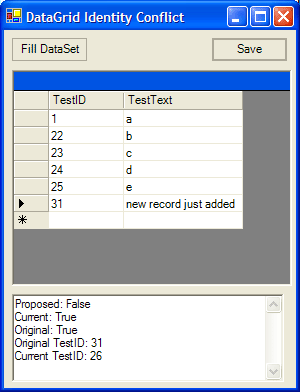
As you can see by the image above, after hitting the Save button, the SqlDataAdapter sends the
INSERT statement to MS SQL Server and then retrieves an updated version of the record from
the database via a SELECT statement. The correct identity value is retrieved from the database (26),
but as you can see, it doesn't appear in the DataGrid - the original value is still there!
Even though the correctly retrieved identity value is set to the Current version of the DataRow,
it is not so in the DataGrid.
The Current version contains the correct value. The Original version does not. The DataGrid
cell objects bind to the Original version of the DataRow object.
So, the key is to update the DataRow's TestID column, in this example, to the correct value so
we can see it in the DataGrid control. To do that we need to create an SqlDataAdapterRowUpdated event handler and update the Original version value to that of the
Current value like this:
private void sqlDataAdapter1_RowUpdated(object sender,
System.Data.SqlClient.SqlRowUpdatedEventArgs e)
{
if (e.Row.HasVersion(DataRowVersion.Original) &&
e.Row.HasVersion(DataRowVersion.Current) &&
e.Row.RowState != DataRowState.Deleted)
{
dsDataSetIdentityProblemTest1.tblTest.FindByTestID(
int.Parse(e.Row[0, DataRowVersion.Original].ToString())).TestID =
int.Parse(e.Row[0, DataRowVersion.Current].ToString());
}
}
NOTE: in order for you to be able to update an identity value you must ensure that the identity
column's readonly property is set to false.
Once that is done, the DataGrid will reflect the correct identity values!

 Current .Net Version: 1.1.4322