Typically, when you create a Visual Studio .NET application, any assembly references by default that are not part of the
GAC (Global Assembly Cache) are copied to the project's output directory (same directory as the compiled EXE or DLL).
In ASP.NET, the \bin directory of the application's Virtual Directory in IIS is searched for assembly references to
load that are also not part of the GAC.
If you do not want to use a component/distributed architecture using XML Web Services or the Remoting classes in
the .Net framework then you may want to learn how to load an assembly from a remote application server. To do
this you need to accomplish two things:
Create a Strong-Name assembly.
Add the appropriate XML configuration elements to the consuming .Net
application (app.config for Visual C# projects, appname.exe.config for VB.Net projects and web.config for ASP.NET
applications).
I do NOT recommend loading assemblies remotely. Instead, add an assembly to the GAC or application's \bin directory on
the computer where the application is to run. Or, better yet, use XML Web Services and/or Remoting
classes in the framework for a distributed architecture instead. When using XML Web Services and Remoting classes you
still need to maintain copies of remote assemblies: one for the remote machine (aka, application server,
e.g., Web Services, Remoting process)
for serving the assembly and one for providing a reference to the consuming application (e.g., Windows Forms, ASP.NET).
REMEMBER: We are dealing with 2 VS.NET projects here: (Project #1) the project containing the strong-named
assembly and (Project #2) the project containing the application that is to consume the strong-named assembly.
Project #2 can be wither a Windows Forms or ASP.NET (Web Forms) application.
(Project #1) Creating a Strong-Name Assembly with Visual Studio .Net:
Create your assembly project in Visual Studio .NET.
Go to Start\Programs\Microsoft Visual Studio .NET\Visual Studio .NET Tools in Windows
then click on Visual Studio .NET Command Prompt.
Type cd path_to_vs_assembly_project the press [Enter].
path_to_vs_assembly_project is the path to where your assembly VS.NET project
is stored (e.g., C:\My Documents\Visual Studio Projects\MyAssemblyProject).
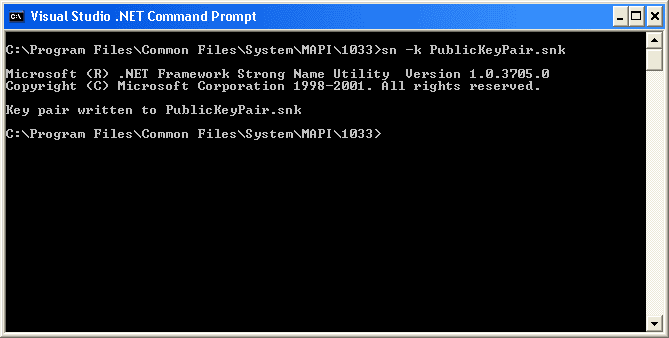
Type sn -k StrongNameKeyPair.snk then press [Enter].
Here's an example:
Now type sn -t StrongNameKeyPair.snk - this command will produce a key token
which you should save for later as you will need it in part #2.
In Visual Studio .NET, open the Solution Explorer then double-click on the
AssemblyInfo file (.cs for C# and .vb for VB.NET).
Look for an [assembly: AssemblyVersion("1.0.*")] entry and replace the current
version (by default it is 1.0.*) to a fixed version such as 1.0.0.1.
Look for an [assembly: AssemblyKeyFile("")] entry and replace it with this:
[assembly: AssemblyKeyFile("..\\..\\StrongNameKeyPair.snk")]. This points to
the project directory where you generated the Strong-Name key pair file in the
preceding steps (make sure it's there!).
Compile your assembly/project. Viola, you created a strong-named assembly (which can now
be added to the computer's GAC [Global Assembly Cache] too!).
(Project #2) Telling the CLR to Load the Assembly (ies) Remotely via the Application
Configuration File :
In a Visual C# project, make sure you have an app.config XML file already added to the
project that is to consume the strong-named assembly.
Add the following section(s) to the app.config XML file:
<?xml version="1.0" encoding="utf-8" ?>
<configuration>
<runtime>
<assemblybinding xmlns="urn:schemas-microsoft-com:asm.v1">
<dependentassembly>
<assemblyidentity name="MyRemoteAssembly" publickeytoken="28b123cd112cc123" culture="neutral"/>
<codebase version="1.0.0.1" href="http://ApplicationServer/Assemblies/MyRemoteAssembly.dll"/>
</dependentassembly>
</assemblybinding>
</runtime>
</configuration>
Things to do with this XML:
Replace the MyRemoteAssembly in name="MyRemoteAssembly" with
the name of the strong-named assembly you compiled in previous steps.
By default the name of an assembly if the same as the project's name
otherwise it is set to whatever is in the
[assembly: AssemblyTitle("AssemblyName")] attribute of the
AssemblyInfo file of that project.
Replace the 28b123cd112cc123 token in
publicKeyToken="28b123cd112cc123" to that which you extracted
when executing the command sn -t StrongNameKeyPair.snk.
Replace the http://ApplicationServer/Assemblies/MyRemoteAssembly.dll"
URI to wherever the assembly is stored. For example, if the assembly
you compiled was called MyRemoteAssembly.dll and was stored
in a share called MyShare on a server called MyServer
then the href="" attribute would read:
href="file://\\MyServer\MyShare\MyRemoteAssembly.dll".
Replace the culture= value with whatever is specified in the
remote assembly's AssemblyInfo file's
[assembly: AssemblyCulture("")] attribute - if it is empty then
the CLR compiles the assembly with a culture of neutral by
default.
If you have not already added a reference to the assembly in Project #2 to the assembly in
Project #1 then you should do so. Remember, however that the path specified in a
reference is not always where the CLR will load the assembly from!
Compile the project or deploy it for ASP.NET applications.
NOTE: What we have done here is both create a strong-named assembly and told an application where to
load a particular assembly from . In ASP.NET you normally don't need to add a refernce to an assembly in
web.config as most of the assemblies used are either loaded from the GAC or the Virtual
Directory's \bin directory. However, when you want to load an assembly remotely you need to
a an explicit reference to that directory or add it the assembly to the GAC so that the
metadata of that assembly can be readily available to the CLR upon compilation of the
Window Form or ASP.NET applcation.
You can copy the assembly to the ASP.NET application's \bin directory or the GAC but then
you would consistently have to update both the remote assembly and the local assembly (causing DLL hell!).
In ASP.NET, I add a reference to the web.config file that points to a strong-name assembly in
GAC on that ASP.NET (IIS) computer like this:
<system.web>
<customerrors mode="Off"/>
<compilation>
<assemblies>
<add assembly="MyAssembly, Version=1.0.0.0, Culture=neutral, PublicKeyToken=28b123cd112cc123"/>
</assemblies>
</compilation>
</system.web>
In Visual Studio .NET I add a reference to an assembly using a UNC path such as
\\MyServer\MyShare\MyAssemblies\MyAssembly.dll. This way, I consistently have a common place where
to store assemblies that many of my .NET applications can reference.

 Current .Net Version: 2.0.50727