
|
The LBTT Spot "Lifeline is focused on developing and marketing systems designed to assist in the early detection of breast and ovarian cancer." |
|---|

| DataGrid Identity Increment Conflicts with MS SQL Server |
|---|
| View C# Source Code |
|---|
DataGrid Identity Increment Conflicts with MS SQL ServerThe identity incremental feature of the DataGrid control conflicts with MS SQL Server when hosting a DataSet with an identity column. Learn how to fix this.Category: Windows Forms, ADO.NET, SQL Server, Visual Studio .NET, Posted 6/15/2003, By Mike G. This article may help you if you are building Windows Forms applications that meet all of the following criteria:
In the example above, if you click on the new record at the bottom of the DataGrid a new identity is automatically generated by the control for this record. If you don't end up creating the record by filling in data in the TestText column then navigating out of the record the next identity value is used for when you do end up creating a new record in the grid. This can be a problem since identity values generated by the DataGrid do not conincide with those generated by MS SQL Server. If you use an SqlDataAdapter to update the data in the DataGrid then an INSERT statement is automatically generated for you by default. After the INSERT statement occurs a proceeding SELECT is used to retrieve a 'refreshed' version of the record from the MS SQL Server database. Now, if the SqlDataAdapterInsertCommand's UpdateRowSource is so to Both or FirstReturnedRecord the is is assumed that the values in the DataRow affected by the INSERT should be automatically updated - this does not happen! It is up to you to update the affected DataRow yourself. A DataRow typically contains two versions of the row after a an INSERT statement is performed against it: Original and Current. 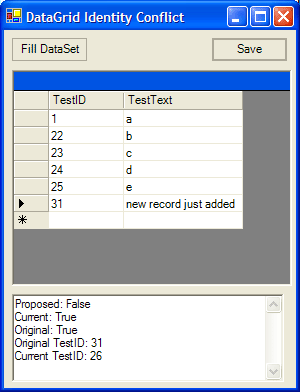
As you can see by the image above, after hitting the Save button the SqlDataAdapter send the INSERT statement to MS SQL Server then retrieves an updated version of the record from the database via a SELECT statement. The correct ID is retrived from the database (26) but as you can see it doesn't appear in the DataGrid - the original value is still there! Eventhough the correctly retrieved identity value is set to the Current version of the DataRow it is not so in the DataGrid. The Current version contains the correct value. The Original version does not. The DataGrid cell objects bind to the Original version of the DataRow object. So, the key is to update the DataRow's TestID column, in this example, to the correct value so we can see it in the DataGrid control. To do that we need to create an SqlDataAdapter RowUpdated event handler and update the Original version value to that of the Current value like this: Once that is done, the DataGrid will reflect the correct identity values! |