
|
Creating Events with C#
Learn how to define events in classes using C#.
Category: .Net Framework, C#, ASP.NET, Events,
Posted 1/2/2003,
By Mike G.
Events are defined as variables. When defining an event variable you must assosiate with it a delegate it can
use to invoke a target method.
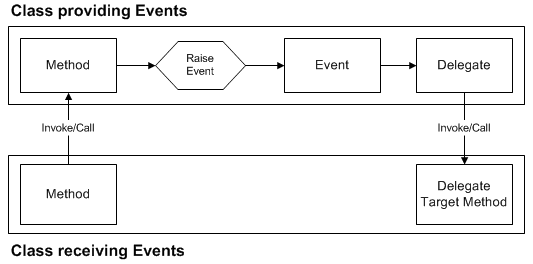
- Creating the delegate:
public delegate void NumberTooHighDelegate(int Number);
- Creating the event:
public event NumberTooHighDelegate NumberTooHighEvent;
- Raising the event:
NumberTooHighEvent(Number1 + Number2);
- Creating the delegate, creating the event and raising the event should be confined to a given class:
public class MTG {
private int intA, intB;
// note: both delegate and event declarations MUST be made public
public delegate void NumberTooHighDelegate(int Number);
// public event [Delegate Variable] [Event Variable];
public event NumberTooHighDelegate NumberTooHighEvent;
public int AddTwoNumbers(int Number1, int Number2) {
if (Number1 + Number2 > 100) NumberTooHighEvent(Number1 + Number2);
return Number1 + Number2;
}
}
- Assigning an Event Handler to the event outside of the class/object:
// this is the event handler method that handles an HtmlInputInput ServerClick event in ASP.NET:
private void Add_Click(Object source, EventArgs e) {
try {
MTG m = new MTG();
// you can use the 'new' keyword to create an instance
// of a delegate (virtual method):
m.NumberTooHighEvent += new MTG.NumberTooHighDelegate(MTG_NumberTooHigh);
txtAns.Value = m.AddTwoNumbers(Convert.ToInt32(txtNum1.Value),
Convert.ToInt32(txtNum2.Value)).ToString();
}
catch (Exception err) {
ltrStatus.Text = err.Message;
}
}
// this is the Delegate method for the MTG.NumberTooHigh event:
private void MTG_NumberTooHigh(int Number) {
ltrStatus.Text = "The sum of two numbers provided exceeded 100!";
}
|
|
